




I spent time with Perfect Viewer as a comics reader, paying particular attention to how comfortably it works in different situations rather than judging it only by speed. Developed by Rookie001, this free app has been around since October 2, 2010, and its long presence is easy to understand: it focuses on opening and reading image-based comics without surrounding the experience with unnecessary social features or editorial clutter.
Its audience is broad. A casual reader can use it for an occasional graphic novel, while someone with a large personal collection may appreciate having a dedicated viewer instead of relying on a general photo app. The app is rated for Everyone, runs on Android 4.4 and later, and its current version is 5.0.4.5. That combination makes it approachable for people using older devices, although the experience still depends heavily on screen size, file quality, and how the collection is organized.
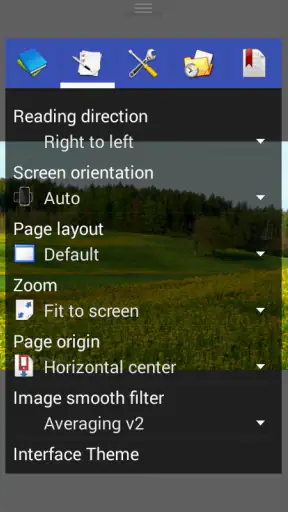
What interested me most was the way a focused reader can support different abilities and contexts. A comics app does not need to advertise itself as an accessibility tool to make reading less tiring. Clear page presentation, predictable navigation, sensible zoom behavior, and the ability to adjust how images are viewed can make a real difference. Perfect Viewer gets much of that right, but it also has a learning curve that may frustrate readers who expect a modern, instantly obvious interface.
Reading comfort starts with control over the page
The central strength here is that the app treats a comic page as something to inspect, not merely as a picture to open. When a page contains small lettering, dense panels, or artwork designed for a larger printed format, I found it more useful to have a dedicated viewer than to pinch around inside a standard gallery. The reading process feels intentional: open the collection, move through pages, enlarge details when needed, and return to the broader composition.
That matters for readers with reduced visual acuity, but it is also helpful when lighting is poor or the device has a modest display. A reader on a small phone may need to examine speech bubbles one at a time, while someone on a tablet may prefer to see an entire page without interruption. The important trade-off is that zoom improves legibility at the cost of context. Once enlarged, you may need to move around the page to follow the panel order, especially in comics with unusual layouts.
I recommend testing a few different page styles before deciding whether the app suits you. A conventional left-to-right comic is easier to navigate than a page with overlapping panels, vertical text, or artwork that depends on seeing the whole spread. Perfect Viewer is strongest when you are willing to adjust your reading approach to the material instead of expecting every page to behave like a simple document.
The most useful habit is to separate “seeing the page” from “reading the lettering.” I first look at the complete composition, then enlarge only the areas that need attention. That avoids losing the visual rhythm of a page and reduces the amount of constant panning. It is a small workflow, but it makes long reading sessions calmer and helps readers who tire quickly when they must repeatedly search for the next panel.
Navigation rewards a short learning period
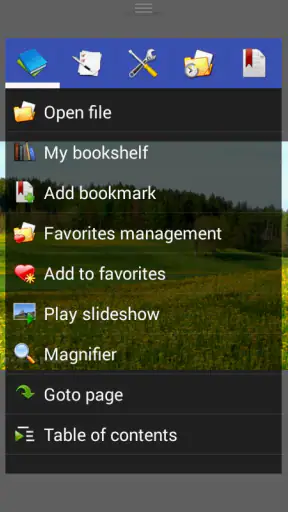
The app’s controls are built around reading rather than browsing a feed. That is good for concentration, but it means the first session can feel less obvious than opening a comic in a mainstream media application. You need to become comfortable with the relationship between taps, swipes, zooming, and page movement. Once those actions become familiar, the interface fades into the background, which is exactly what I want from a viewer.
For someone with limited dexterity, the difference between a deliberate page gesture and a tiny interface button is significant. A swipe across a large area can be easier than targeting a small control, but swipes can also be triggered accidentally when the reader is trying to reposition a zoomed page. I suggest practicing with a short comic before starting a long volume. This gives you a chance to learn how the app responds without losing your place in an important story.
Readers who use their phone one-handed should also think about device size. A compact phone can be easier to hold, yet its smaller screen demands more zooming. A larger phone or tablet improves page visibility but may require two hands, a stand, or a stable surface. Perfect Viewer cannot remove that physical trade-off; it simply gives you a more suitable environment for handling image-heavy pages than many general-purpose viewers.
Organizing a personal library changes the experience
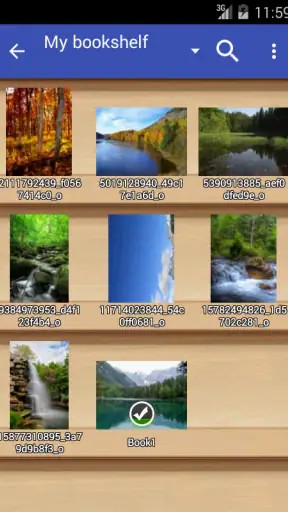
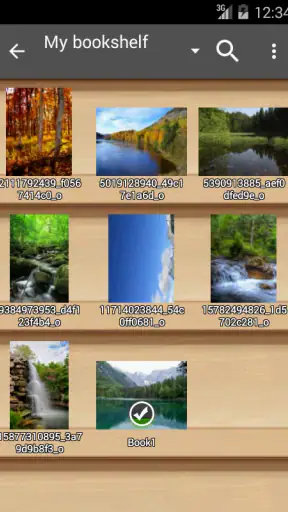
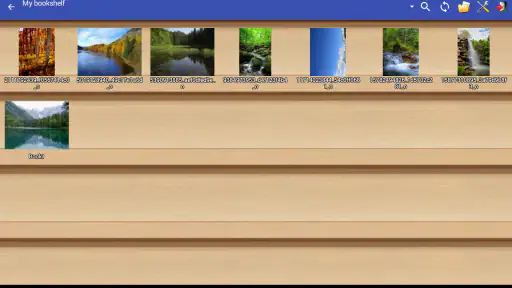
Perfect Viewer makes the most sense when you already have comics or image collections stored on your device. It is not primarily a discovery service, so the quality of your own file organization affects how pleasant it feels. If folders are named clearly and volumes are kept together, returning to a series is straightforward. If everything is mixed into one crowded location, the app can feel more like a file browser than a reading room.
My practical advice is to organize by series first and reading order second. Avoid relying only on cover images, because covers may not always make the intended sequence obvious. This is especially useful for readers who have difficulty remembering where they stopped or who need to reduce the number of decisions required before reading. A clean folder structure is not a feature of the viewer itself, but it is one of the biggest factors in whether the app feels accessible day after day.
There is also a privacy and convenience angle to this arrangement. Keeping a personal collection available locally can be useful when you are traveling, commuting, or dealing with an unreliable connection. At the same time, it places responsibility on you to manage storage and backups. If a collection exists only on one phone, replacing that phone or clearing its storage can interrupt your reading routine. The app is a viewer, not a complete library-management strategy.
How it handles different bodies, senses, and places
Motor considerations: fewer precise targets can help
A comics reader is often used for extended periods, so unnecessary tapping becomes tiring. Perfect Viewer’s focused design can be an advantage because reading does not require constant interaction with menus, comments, recommendations, or account screens. Once a page is open, the main task is simply moving through the material and adjusting the view when necessary.
That simplicity is not universal. A person with tremors, limited reach, or difficulty performing repeated swipes may find page navigation demanding, particularly on a small screen. Someone who accidentally touches the display while repositioning a zoomed page may also lose their place. I would not describe the app as effortless for every motor ability, but I do think it is more workable when the device is supported on a desk, stand, or lap rather than held in the air.
A stable setup also benefits readers with pain or fatigue. Using a tablet stand can reduce the need to grip the device, while a larger display may reduce repeated zoom gestures. The best arrangement depends on the person: a lightweight phone is easier to lift, whereas a larger screen may be easier to read. Perfect Viewer gives you a dedicated reading surface, but it cannot compensate for an uncomfortable physical setup.
Visual and sensory comfort depends on the source material
The app can make image-based comics easier to inspect, but it cannot repair every problem in the original file. Low-resolution scans, faint lettering, uneven contrast, or pages with excessive visual noise remain difficult even when enlarged. This is an important distinction: a viewer can improve access to a good image, but it cannot turn a poor scan into a crisp, relettered page.
For readers sensitive to visual clutter, full-page artwork can be both attractive and demanding. Busy backgrounds, overlapping speech bubbles, and dramatic panel borders may require slower reading. I found it useful to pause at the start of a page and identify the likely reading order before zooming. That reduces the chance of jumping around and can make unconventional layouts less overwhelming.
Readers who are sensitive to brightness should also consider the surrounding environment. A bright phone display in a dark room can be uncomfortable, while a dim display in daylight can make small text harder to distinguish. The app is not a replacement for the device’s own display controls, so adjusting system brightness and choosing a comfortable viewing position remains part of the experience. In practice, the same comic can feel easy in one room and tiring in another.
People who rely on spoken content or text extraction should approach this app with different expectations. Image-based comics are not automatically converted into selectable text simply because they are opened in a viewer. If your reading depends on text-to-speech, searchable dialogue, or a reflowable layout, a dedicated image viewer may not be the best primary tool. Perfect Viewer is designed around looking at pages, and that is its strength as well as its boundary.
Situational access is one of its quiet advantages
I can see this app working well in several ordinary situations. Imagine reading during a train journey with intermittent connectivity: a locally stored collection lets you continue without waiting for a page to load from a service. Or picture a reader taking a short break at work who wants to open one volume without navigating a crowded entertainment platform. The focused interface keeps the task direct, provided the files are already available on the device.
It is also useful for comparing artwork. An illustrator, translator, or collector may want to examine panel composition, lettering placement, or page details without the distractions found in a streaming-style comics service. Zooming into a particular area and then returning to the full page supports that kind of close inspection better than a basic image gallery.
On the other hand, the app is less suitable when your main need is discovery. If you want personalized recommendations, synchronized reading across several devices, publisher catalogs, or a built-in subscription library, an online comics platform will probably be more convenient. Those services usually handle acquisition and progress tracking more smoothly, while Perfect Viewer gives you more direct control over files you already possess.
This difference also affects family use. The Everyone rating makes the app broadly approachable, but the content you open is still determined by your own collection. A parent should therefore think of the rating as describing the application’s general suitability, not as a guarantee that every comic in a folder is appropriate for every reader. Keeping personal and shared collections clearly separated is a sensible routine in a household.
Where the app creates friction
The main barrier is not reading performance; it is the gap between power and immediate clarity. A reader who wants one obvious “open comic” button may feel that the app asks too many questions about files, folders, and viewing behavior. That is the price of a tool aimed at flexibility. I appreciate having control, but I would not hand it to someone who becomes discouraged by interfaces that reveal their options gradually.
The age of the project is another consideration. Its release history reaches back to 2010, and while the current version is 5.0.4.5, the overall feel is that of a specialized utility rather than a polished modern storefront. That is not automatically negative: older software can be dependable and lightweight. Still, users accustomed to automatic cloud synchronization, elegant onboarding, and seamless device handoff may find the experience less refined than newer services.
There is also a trade-off between local control and convenience. A personal collection gives you independence from an online catalog, but you must locate the files, maintain their order, and think about backups yourself. Readers who have limited energy for digital housekeeping may prefer a service that remembers everything automatically. Readers who value ownership and offline access may consider that extra responsibility worthwhile.
Performance can vary with the material and the device. Large, detailed pages are naturally more demanding than small images, and older hardware may make rapid browsing less comfortable. Because the app supports Android 4.4 and later, it can remain relevant on devices that newer readers may overlook, but compatibility does not mean every large collection will feel equally quick. I would test a representative sample of your own comics rather than judging it from a single lightweight file.
What the wider reception suggests
The app has a 4.3 average from around 58 thousand ratings, with roughly 3.3 thousand written reviews, and it has passed 5 million installs. Those figures suggest that Perfect Viewer has found a substantial audience, especially among people looking for a dedicated way to handle image-based reading. I treat that as useful context rather than proof that it will suit everyone: a reader’s file habits, device, eyesight, and preferred navigation style matter more than popularity alone.
Its free price lowers the cost of trying it, which is valuable when you are unsure whether a specialized viewer will fit your routine. You can evaluate the controls with your own collection rather than committing first to a paid catalog or subscription. The more important investment is your time: a few minutes spent learning the navigation and arranging folders can determine whether the app feels efficient or awkward.
My inclusive verdict
I recommend Perfect Viewer to readers who want a focused, free comics app for personal image collections and who are willing to learn a utility-style interface. It is particularly appealing when offline reading, close examination of page artwork, and control over a local library matter more than recommendations or automatic synchronization. For many people, that directness is a genuine accessibility benefit because it removes unrelated screens and keeps attention on the page.
I would steer some readers elsewhere. If you need selectable text, spoken dialogue, automatic reflow, a built-in comic store, or effortless progress across devices, a specialized online service or a format designed for those needs will be a better choice. If precise swipes are difficult, test the app with your usual device before moving a large collection into it. A stand, a larger screen, and a carefully arranged library can improve the experience considerably, but they cannot solve every motor or sensory barrier.
My final impression is positive but practical. Perfect Viewer does not make a grand promise about supporting every reader, and I would not treat it as a universal accessibility solution. What it does provide is a focused space for viewing comics, with enough flexibility to adapt to different page sizes, devices, and reading situations. For readers who value control over convenience, it remains a thoughtful tool; for readers who need automation and built-in assistance, its very flexibility may become the obstacle.


